Find Device: BLE Scanner — Locate Lost AirPods & Bluetooth Gadgets Fast

iPhone & iPad Utility
Find Device: BLE Scanner
Locate lost AirPods, trackers, and nearby Bluetooth devices with real-time radar and proximity sensing.
Free to download · Optional Pro subscription · Data Not Collected
See the app in action

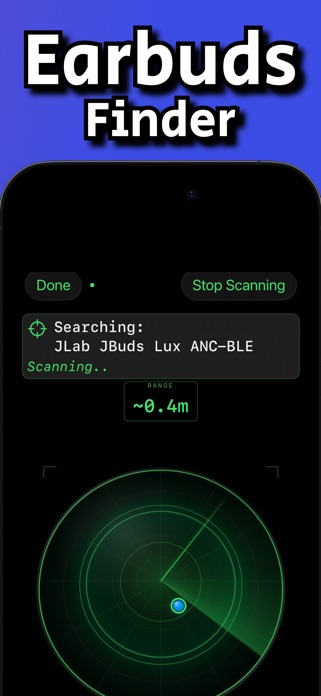

Real-time radar · Proximity sensing · Deep Scan
What is Find Device: BLE Scanner?
Find Device: BLE Scanner helps you discover and locate nearby Bluetooth Low Energy devices. Use signal strength and a live radar view to walk toward stronger readings—and toward the device you’re looking for.
Ideal when you need a Bluetooth device finder, an AirPods locator helper, or a clean BLE scanner for iPhone: scan, filter, select, then follow the radar.
Devices people commonly search for
- Headphones & earbuds — AirPods, Bose, Sony, and similar BLE audio gear
- Apple devices — iPhone, iPad, Apple Watch, Apple Pencil (when advertising over BLE)
- Wearables — Fitbit trackers, Oura rings, and other smartwatches
- Hidden tech — many other BLE accessories within range
Note: The device must be powered on with Bluetooth available. Extremely distant or powered-off devices cannot be found.
Key features
- Real-time radar — visualize nearby Bluetooth signals on one screen
- Proximity sensing — watch the signal strengthen as you get closer
- Smart discovery — uncover named and unnamed BLE devices in range
- Filters & sorting — show Named or All devices; sort closest or farthest
- Focused search — select one device and lock onto it with the radar view
- Deep Scan — attempt to gather more information about nearby Bluetooth devices
- Flexible settings — meters or feet, Short/Medium/Long scan range, Fast/Normal/Slow scan interval
How it works
- Open the app and start scanning for Bluetooth devices around you.
- Filter and sort the list, then tap the device you want to find.
- Follow the radar as proximity updates guide you closer to the strongest signal.
FAQ
Can this find AirPods?
If your AirPods (or case) are powered and advertising over Bluetooth, they can appear in the scan list like other BLE devices. Results depend on distance, interference, and whether the device is still broadcasting.
Does it replace Apple’s Find My network?
No. This is a nearby BLE signal scanner/radar—best for short-range locating when the device is still in Bluetooth range.
Is it free?
Yes, free to download. Optional in-app subscriptions unlock Pro features (see current pricing and trial details on the App Store).
Any limitations?
It may not work if a device is too far away, has no power, or has Bluetooth turned off.

Ready to find your device?
Download Find Device: BLE Scanner and turn nearby Bluetooth signals into a clearer search.
App: Find Device: BLE Scanner · Developer: Curtis Fischer · Category: Utilities
App Store
·
Privacy Policy